Saturday, 30 June 2012

Dynamics CRM 2011 Map solution with OpenStreetMap

I have seen a few tutorials online regarding how to set up Maps with Google or Bing, however this solutions require a license depending how you use them so why not use a free and powerful opensource map solution on your Dynamics CRM 2011 with OpenStreetMap? And the most interesting part you can do that with only two simple configuration steps.

OpenStreetMap is a powerfull worldwide map created by volunteers. You can read more here: http://wiki.openstreetmap.org/wiki/Main_Page

To implement OpenStreetMap on Dynamics CRM 2011 we use the following services:
  • GeoNames (to lookup post codes) -  http://www.geonames.org/
  • OpenLayers (free javascript map library) - http://www.openlayers.org/
  • OpenStreetMap layers
  • Jquery

Step 1 - Create a HTML webresource
 Navigate to Settings > Customizations > Customize the system > click on web resources and click new.


Click Text Editor > click tab source > < paste the below code:


When you save it, you can ignore the error messages $. is undefined. Save and Publish.

Step 2 - Customize your entity
using the account entity start by creating a new section called map:

1.  Customize the main Account form, click the insert tab and select One column Section.


2. Confirm is set to one column and click OK


3. High light the section on the form and go to insert > Webresource and add the osmap_loader


Click ok, Save and Publish.

Result

Open an account make sure the postal code is not empty:
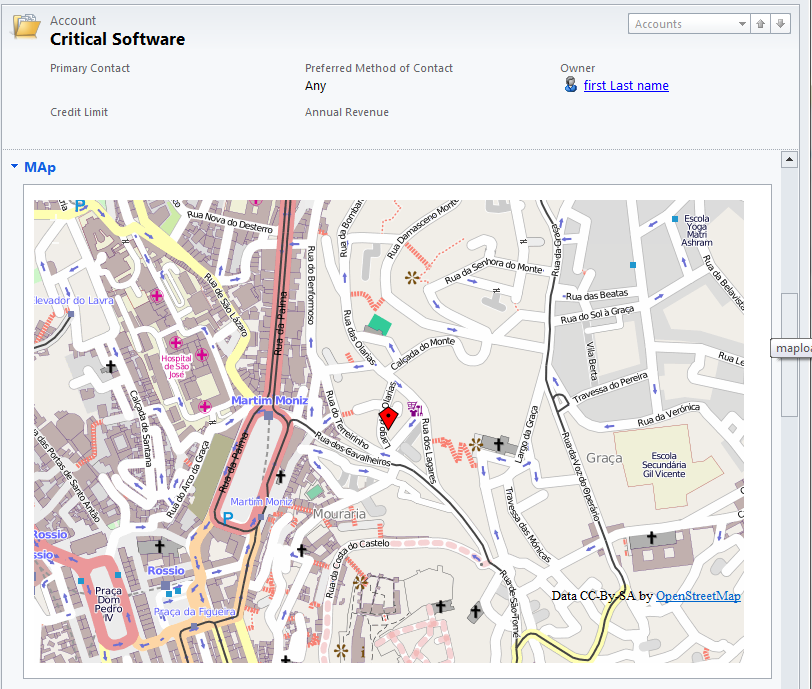


You can navigate around, and zoom in and out.


Summary
Hope you enjoyed this tutorial, is pretty straight forward and completely free of charges.


GeoNames
The solution above uses the Postal code lookup API from GeoNames however GeoNames have  more API's that can search for addresse's cities etc, lookup GeoNames services here:
  • http://www.geonames.org/
Note: On the javascript above code I'm using username=nrodri which is my username, you can register an account for free and replace my username. with a custom username the service gives you 30k lookups a day.

Performance
Note that I'm loading the jquery library and openlayers library on the form, if you have a heavily customized form, this can add some extra load time, my advise would be to collapse the tab and allow users to expand the map as they needed, this way the map will only be loaded when you expand the tab.


Friday, 22 June 2012

Dynamics CRM 2011 Disable Pending E-mail Warning

I needed to disable the below Pending e-mail warning message which pops-up every time you log on to CRM, I couldn't find online the registry key to disable it, so had to "sniff" the registry keys CRM is loading  and the following key come up:

Name: DisablePendingEmailReminder
Type: DWORD
Value: 1


Reset IIS.

Saturday, 16 June 2012

Dynamics CRM 2011 Report Error 'Sys' is undefined and 'Type' is undefined

On a load balanced environment with multiple front-end servers users receive intermitent report errros with the following error messages:
Message: 'Type' is undefined
Line: 5
Char: 1
Code: 0
URI:...
Message: 'Sys' is undefined
Line: 1228
Char: 1
Code: 0
 URI: ...
Message: Object expected
Line: 993
Char: 1
Code: 0
URI:...

I found that the reason for the above errors were related with front-end servers configured with different machine keys, when the traffic hits SERVER1 and if the following request's hit SERVER2 the decryption key will be unable to process the request's causing those errors.

Configure all front-end servers with the same Encryption and Decryption Machine key:

Open IIS and High light Microsoft Dynamics CRM website

Double click Machine  Key


Click on the right generate machine key:


Copy those keys onto all front-end servers.

This should fix the issue. Also confirm you have all SPN's correctly configured for your service accounts.

Wednesday, 6 June 2012

Dynamics CRM troubleshooting user access issues

As time passes, I've realised that in particular with dynamics CRM 4, often I get user account and tenant relationships messed up on the database. CRM fails to create all the user relationships between those tenants. Issues that you may find:
  • User account is visible on the users list and has a security role, however user can't authenticate.
  • You can't assign a security role to a specific user on a specific tenant.
  • User can't connect via Outlook client, with organizationId error.
  • User can't run reports (not a member of ReportingGroup).
The above situations  are typical symptoms of user and tenant relationships not created on the database. A quick way to troubleshoot and understand how the user account relates with different tenants, is illustrated on the below diagram:


As you can see above the Organization database links to the SystemUserOrganizations, so this means on the MSCRM_CONFIG you should have one entry for each tenant the user is member of. The diagram can help you to quickly identify User and Tenant relationships.

Note: for the situation where the user can't run reports, just add the user to the ReportingGroup.

Hope this was useful :)

Tuesday, 15 May 2012

Dynamics CRM 2011 upgrade and Outlook client re-deployment

Post revised on: 16/06/2012
 
Consider the following scenario:
You upgrading your company CRM 4 to CRM 2011 and the CIO has the following requirements:
  1. Minimum down-time possible
  2. Need to sign-off the new CRM 2011 environment/functionality
  3. Easy roll back process
  4. Minimum CRM Outlook Client disruption
Available upgrade options:
  1. In-place upgrade  (upgrade existing CRM 4 servers and database on-the-fly)
  2. Install CRM 2011 on new servers and upgrade existing database (Only changes the database, easier to roll back)
  3. Install new CRM 2011 and new database. Import CRM 4 database into the new CRM 2011 environment.

You need to consider the upgrade method that will minimise down-time and keep all Outlook clients connected.

Upgrade options minimise downtime
Option 1 and 2
These two options are not the most recommended approach when down-time needs to be kept to a minimum::
  • Option 1 
    • If issues encountered full re-install of CRM 4 is needed
    • Full database restore
    • No option for staging environment
  • Option 2 
    • Easier to roll-back no need to full re-install if you install CRM 2011 on different servers
    • Full database restore
    • staging environment only for servers, for roll-back you woudl still need a full restore

Option 3
This option is the most flexible and the less prone for errors. You install CRM 2011
  1. Keeps down-time to minimum option for full staging environment
  2. More flexibility with databases
    1. If during import you find an error, you can fix it on the CRM 4 environment, backup and restore again the database and re-try the import once again.
  3. Easiest approach even when you can't afford new servers, less prone for errors.
    1. You do a clean CRM 2011 install and can set up a vanilla environment to confirm all is working as it should.


Outlook Client re-deployment

To avoid re-configuring or upgrade all Outlook clients, you need to keep two important keys:
  1. User ID
  2. Organization ID
To maintain those keys on the new CRM 2011 database, you need to make sure while importing the new database you select Keep Existing User Mappings. This will keep all mappings the same and will allow old CRM 4 clients to connect to the new CRM 2011 environment.

Note: The fist time users open Outlook they will get a 404 error on the entities menus for the first minute while CRM loads the new settings. The client loads the new folder structure accessing a specific URL which loads the settings and the menus will then start working.

However if you are in a situation which the user mappings are correct but the organization ID has changed, you just need to update the registry key OrgID on the users local computer with the new Orgnization OrgID. This will enable the outlook clients to re-connect successfully.  The Organization Id is stored on the MSCRM_CONFIG database Organization table.

Create/add the following lines to the existing logon script:

reg delete HKEY_CURRENT_USER\Software\Microsoft\MSCRMClient /v orgId /f 

reg add HKEY_CURRENT_USER\Software\Microsoft\MSCRMClient /v OrgId /t REG_SZ /d "{xxxxxxxx-xxxx-xxxx-xxxx-xxxxxxxxxx}" /f 

Note: The Outlook client will still need to be upgraded if you want to make use of all CRM 2011 features.

Summary
  • To keep Outlook clients connected to thew new CRM 2011 environment keep the existing user mappings during the database upgrade
  • If you have available infrastructure the best approach is Option 3, more flexibility and less prone for errors.
Hope it helped

Tuesday, 24 April 2012

Dynamics CRM planning upgrade and system architecture

CRM 2011 has introduced a new system architecture that changes the way Outlook clients communicate with CRM back-end. CRM is less chatty and requires less services but is important to understand the impact on your old CRM 4 infrastructure when upgrading.

If you have a large number of users using the Outlook client then you may have noticed you have thousands of connections to the Platform servers. With CRM 2011 with the default options the front-end server now hosts these services, which means your front-ends will be hit with web traffic and Outlook client traffic at the same time increasing the load on these servers.

Dynamics CRM 4
The following diagram illustrates CRM 4 synch activity when users opens Outlook and when the CRM client is configured:
Note: The services used when the user opens Outlook are the same, when the Client performs a synchronization every 15min

Dynamics CRM 2011
On CRM 2011 by default the services have been moved to the front-end servers, the following diagram illustrates CRM 2011 synch activity:

Note: The services used when the user opens Outlook are the same, when the Client performs a synchronization every 15min 


Conclusion
  • A like-to-like upgrade (front-end, back-end), on environments with 500+ users, depending on server specifications you may expect heavy loads on the front-end servers, due to Outlook Client connections handling more traffic than normal leading to poor performance.
  • Ideally you want to place the CRM 2011 Discovery and specially the Organization Service away from the front-end servers.
  •  Another interesting design change is the Discovery Service is no longer used when synchronizing the Outlook client, which means you can place the discovery server in a low spec server or even turn it off.

I hope this information was helpful.


Tuesday, 10 April 2012

Dynamics CRM 2011 Scaling Email router with Business Units

I wrote an article a few weeks ago on how to install the email router on multiple servers. However the concept and method is a manual process and there is something new with CMR 2011 that can automate the process and easier to scale the email router.

With Dynamics CRM 2011 a new option was introduced on the security profiles that transforms the way we can use the email router. The new change I'm referring to is the queue security options, it has now the ability to read at different levels:
  • Business Unit
  • Parent-child Business unit
  • Organizational
  • User
 These options were not available with CRM 4, you could only do organizational or none. With the new options, we can easily scale our email router implementation by configuring different service accounts for each  business unit with permissions to read only at the business unit level. When installing the email router we specify which service account the email router should use. When using those specific accounts the email router returns only the users from that business unit.

The following diagrams illustrates how the concept works. First consider the following business unit layout:

We have a parent business unit with 4 child business units. Each child business unit represent the company office locations. Each city business unit will hold their own CRM users, security roles etc.

Below a more detailed diagram on how the different email routers would be placed and how many service accounts we would require in order to scale the email router:


The Service account requires Queue and User Settings Read permission at the business unit level.

The service account is configured on the email router configuration tool, deployment tab, deployment profile:


Hope this was helpful.